How do you create an invoice that looks professional, includes the right information, handles Canadian taxes correctly, and helps you get paid on time?
You have finished the work. Now it is time to get paid.
But a confusing or incomplete invoice can slow things down. If your client cannot quickly see what they are paying for, how much they owe, and when payment is due, you may end up answering unnecessary questions or chasing payments.
The good news is that creating a professional Canadian invoice is not difficult.
Start with your business and customer details. Add a unique invoice number, list the products or services, show the subtotal and applicable taxes, and clearly state the payment terms.
Whether you are a freelancer, contractor, consultant, tradesperson, agency, or small business owner in Canada, a clear invoice makes your billing process easier and gives your customer a proper record of the transaction.
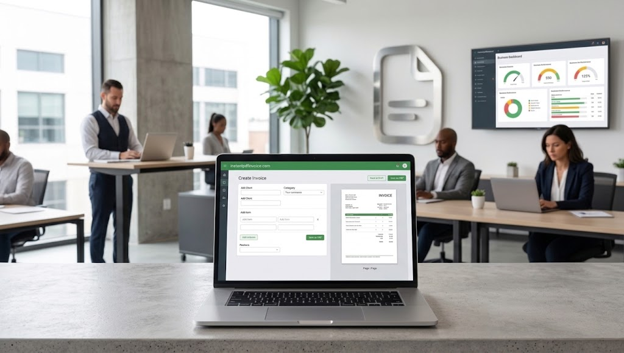
If you send invoices regularly, using an invoice template can save time. Our free invoice generator lets you create invoices online and export them as PDF files.
This guide explains what to include on a Canadian invoice, how GST/HST and other sales taxes can affect your invoice, how to create one step by step, and which common mistakes to avoid.
Important: Canadian tax rules can vary based on your registration status, province or territory, the type of goods or services you sell, and the details of the transaction. This guide provides general information, not tax advice. When you are unsure, check the latest CRA or provincial guidance.
Key takeaways
- Add your business and customer information
- Give every invoice a unique number
- Include the invoice date and payment due date
- Clearly describe each product or service
- Show the quantity, rate, subtotal, taxes, and total
- Explain when and how the customer should pay
- Apply GST/HST, QST, PST, or other taxes only when they apply
- Keep copies of invoices and supporting business records
- Use invoice templates to make regular billing faster
What is an invoice?
An invoice is a document that tells a customer how much they need to pay for goods or services.
It normally includes the seller's information, customer's information, items or services provided, prices, taxes, payment terms, and due date.
An invoice is different from a receipt. An invoice asks for payment. A receipt confirms that payment has already been made.
For example, imagine a Canadian freelancer has completed a $1,500 branding project. The invoice could show the project description, amount charged, applicable tax, payment deadline, and payment method.
Invoices also become part of your business records. They can help you track sales, payments, and tax-related information.
What to include on a Canadian invoice
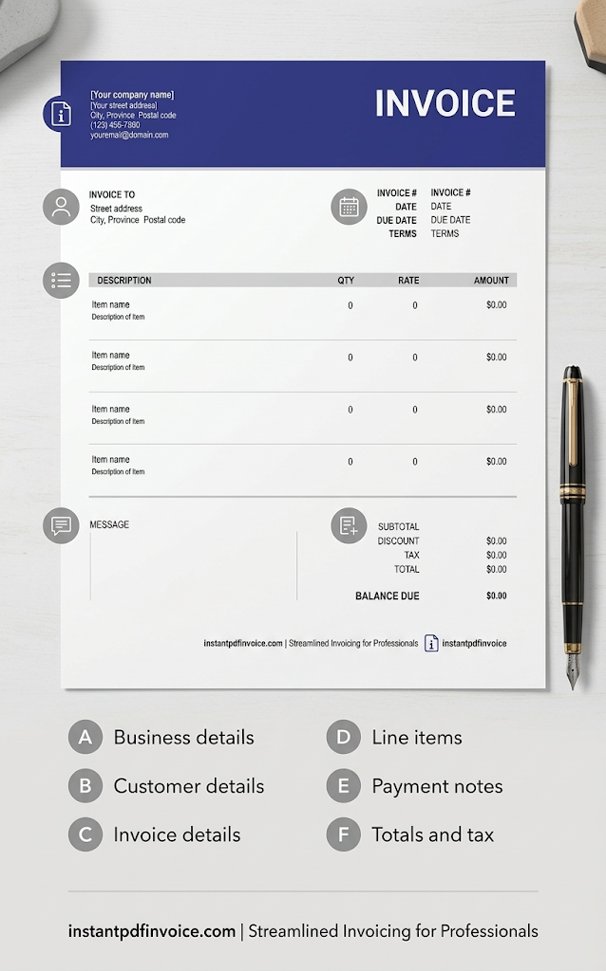
The exact information you need can depend on the transaction and your tax registration status. However, a professional invoice usually contains the following sections.
1. Business information
Start with your own business details. Depending on your situation, include:
- Business or legal name
- Business address
- Email address
- Phone number
- Website
- Business number
- GST/HST number, if applicable
- QST number, if applicable
- Business logo, if you use one
If you are registered for GST/HST or another applicable tax, make sure the required registration information is shown correctly.
2. Customer information
Next, identify the customer. Include:
- Customer or company name
- Billing address
- Email address
- Contact person's name
- Purchase order or project number, if applicable
The more clearly you identify the customer and project, the easier it is to match the invoice with the work.
3. Invoice number and dates
Give every invoice a unique number. For example:
- Invoice #: INV-2026-014
- Invoice Date: September 29, 2026
- Due Date: October 29, 2026
A consistent numbering system makes your invoices much easier to organize later.
4. Products or services
This is one of the most important parts of the invoice. Tell the customer exactly what they are paying for. For example:
| Description | Quantity | Rate | Amount |
|---|---|---|---|
| Website design | 1 | $1,500 | $1,500 |
| SEO setup | 1 | $450 | $450 |
| Hosting setup | 3 months | $50 | $150 |
Avoid vague descriptions such as "Services — $2,100." Your customer should be able to understand the charge without having to contact you for an explanation.
5. Subtotal, taxes, and total
Make the calculations easy to see. For example:
- Subtotal: $2,100
- GST: $105
- Total Amount Due: $2,205
The tax you charge depends on your registration status, the type of goods or services, the place of supply, and other factors.
The GST amount in the example above is only an example. Do not copy a tax amount from another invoice without checking whether the same tax applies to your transaction.
6. Payment terms
Tell your customer exactly when and how to pay. Your payment section can include:
- Due date
- Accepted payment methods
- Deposit requirements
- Partial payment arrangements
- Late-payment terms, where applicable
Common terms include: Due on Receipt, Net 7, Net 15, Net 30, and Net 60.
Clear payment terms remove guesswork and make follow-up easier.
7. Notes
A notes section can be useful for information that does not fit into the main invoice. You could include:
- Project references
- Purchase order numbers
- Payment instructions
- Delivery details
- Warranty information
- Other relevant notes
Keep this section short and useful.
Canadian GST/HST and invoice requirements
Taxes are often the most confusing part of creating an invoice in Canada. The important thing to remember is that not every business charges the same tax.
Your obligations can depend on factors such as your GST/HST registration status, the type of sale, and where the supply is considered to take place.
Do you have to register for GST/HST?
Not every Canadian business has the same GST/HST obligations. For many businesses, the small supplier threshold is $30,000. However, the registration rules depend on how and when you reach that threshold.
For example, different rules can apply if you exceed the threshold in a single calendar quarter or over four consecutive calendar quarters.
Do not treat $30,000 as a simple rule that applies to every situation. Check the current CRA requirements for your circumstances.
What tax should you put on a Canadian invoice?
If you are registered for GST/HST, you need to follow the applicable CRA requirements when charging and reporting tax.
Your invoice may need specific information depending on the transaction and invoice amount. Your customer may also need the information on the invoice to support an input tax credit claim.
For current requirements, check the CRA guidance on charging and collecting GST/HST.
How to create an invoice: step-by-step
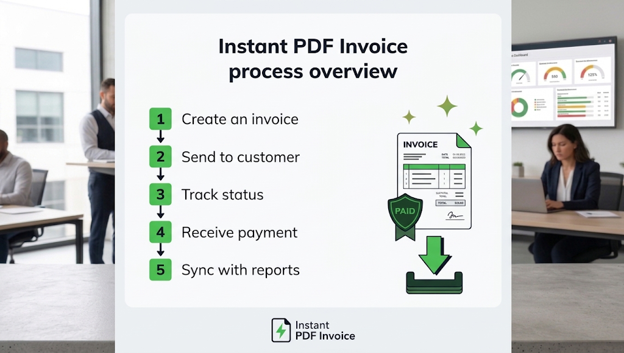
Once you know what information belongs on the invoice, creating one becomes much easier.
Step 1: Add your business information
Start with your business name, address, contact details, and applicable tax registration numbers. Keep this information consistent across your invoices.
Step 2: Add your customer's information
Enter your customer's name, company name, billing information, and any purchase order or project number. Double-check the spelling before sending the invoice.
Step 3: Add the invoice number and dates
Give the invoice a unique number. Then add the invoice date and payment due date. A clear due date helps both you and your customer track the payment.
Step 4: List your products or services
Break the work into clear line items. For an hourly project:
10 hours × $75 per hour = $750
For a fixed-price project:
Website redesign = $2,500
If the customer can understand each charge at a glance, your invoice is doing its job.
Step 5: Calculate the subtotal and applicable taxes
Add all line items together. Then account for:
- Discounts
- Surcharges
- GST
- HST
- QST
- PST
- Other applicable charges
Only add a tax when it actually applies to the transaction.
Step 6: Add payment terms
State the due date and accepted payment methods. Our invoice generator supports payment options such as Stripe, PayPal, and bank transfers.
If you invoice regularly, our features page covers tools for invoice creation and payment management.
Step 7: Review and send
Before sending the invoice, check everything. Review:
- Customer name
- Business details
- Invoice number
- Invoice date
- Due date
- Line items
- Quantities
- Rates
- Calculations
- Taxes
- Total
- Payment terms
- Tax registration numbers
Then save a copy and send the invoice to your customer.
How to create an invoice template
If you invoice customers regularly, a template can save you a lot of time. Instead of creating every invoice from the beginning, create a standard layout containing:
- Business details
- Customer details
- Invoice number
- Invoice and due dates
- Product or service description
- Quantity
- Rate
- Subtotal
- Taxes
- Total
- Payment terms
- Notes
When a new job comes in, update the customer and project information instead of rebuilding the entire invoice.
You can also start with invoice templates designed for different types of businesses.
Free invoice templates for Canadian small businesses
A free invoice template gives you a ready-made structure. This can be useful when you want a professional-looking invoice without designing one from scratch.
Different businesses also have different billing needs:
- A freelancer may charge by the hour or by project
- A contractor may need separate lines for labour, materials, equipment, deposits, and progress payments
- A retailer may need product quantities, SKUs, discounts, shipping charges, and taxes
Choosing a template that matches your type of work can make the invoice easier for your customer to understand.
PDF, Word, or Excel invoice?
| Format | Good For | Why It Works |
|---|---|---|
| Final invoices | Keeps the layout consistent | |
| Word | Editable invoices | Easy to customize |
| Excel | Detailed calculations | Useful formulas and calculations |
| Invoice generator | Quick billing | Faster invoice creation |
PDF is often a practical choice for the final invoice because the layout stays consistent when the customer opens it.
How to create a PDF invoice online
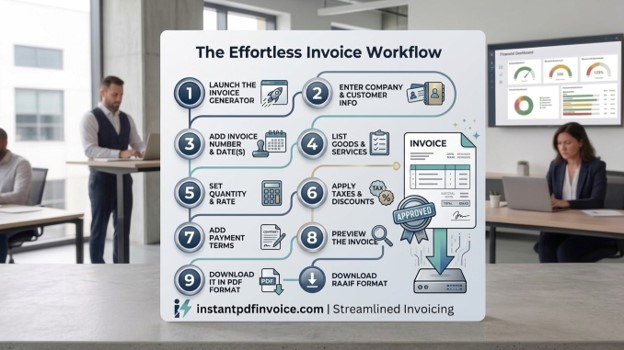
An online invoice generator can make the whole process faster. With our invoice generator, the basic process is:
- Open the invoice generator
- Enter your business information
- Add your customer's information
- Enter the invoice number and dates
- Add your products or services
- Enter quantities and rates
- Apply applicable taxes and discounts
- Add payment terms
- Review the invoice
- Download it as a PDF
Our basic invoice generator lets users create and download PDF invoices without registering. The platform also offers features such as recurring invoices, payment reminders, estimate-to-invoice conversion, and online payments.
How to create invoices for different Canadian businesses
The basic invoice structure stays similar, but the line items can change depending on the business.
Freelancers
Freelancers may charge by the hour, project, milestone, retainer, or deliverable. Each charge should clearly explain what work was completed.
Contractors
Contractors may need separate charges for:
- Labour
- Materials
- Equipment
- Deposits
- Advance payments
- Progress payments
Breaking these costs down makes the invoice easier to review.
Consultants
Consultants may charge an hourly rate, daily rate, project fee, or retainer. The description should make it clear what service the customer is being billed for.
Businesses selling products
Product invoices may include:
- Product name
- SKU
- Quantity
- Unit price
- Discounts
- Freight charges
- Applicable taxes
- Total
Businesses selling recurring services
If you bill customers weekly, monthly, or yearly, recurring invoices can reduce repetitive work. You can keep the main invoice structure the same and update the billing period and charges.
Canadian invoice record keeping
Sending the invoice is not the end of the process.
Your business may need to keep invoices and other documents that support your sales and tax records. The CRA provides guidance on keeping GST/HST and other business records.
Keep clear copies of documents such as:
- Sales invoices
- Receipts
- Payment records
- Contracts
- Tax documents
- Other documents supporting your business transactions
The general CRA retention period is six years from the end of the last tax year to which the records relate, although exceptions can apply in certain situations.
Common invoice mistakes to avoid
1. Leaving out the invoice number
Every invoice should have a unique number. This makes it easier to find, track, and discuss later.
2. Using vague descriptions
"Services — $2,100" does not tell the customer much. Use a description that explains what was provided.
3. Forgetting the due date
A customer should not have to search through an email to find out when payment is due. Put the due date directly on the invoice.
4. Charging the wrong tax
The applicable tax depends on your situation and the transaction. Do not assume that every Canadian customer should be charged the same tax.
5. Assuming every field is mandatory
Some details improve the appearance and usefulness of an invoice but may not be legally required in every situation. For example, a logo can make an invoice look more professional, but tax-related requirements are a different matter.
6. Making calculation errors
Check: quantity, rate, discounts, subtotal, tax, and final total. Even a small calculation error can create unnecessary back-and-forth with a customer.
7. Leaving out payment instructions
Make it easy for your customer to understand how to pay. Clearly state your accepted payment methods and any important payment instructions.
8. Sending an incomplete invoice
Before sending it, look for: empty fields, wrong dates, incorrect customer information, placeholder text, missing tax information, and calculation errors.
A final review takes a minute but can prevent avoidable problems. For a full checklist, see our guide on common invoice mistakes that delay payments.
Frequently Asked Questions
What should be included in an invoice in Canada?
The exact requirements depend on the transaction and your tax registration status. In general, an invoice should identify the seller and customer, describe the goods or services, show the amount charged, include the invoice date, and show applicable taxes.
Do I have to charge GST or HST?
Not every business has to charge GST/HST. For many businesses, the small supplier threshold is $30,000, but the registration rules depend on the circumstances. Check the current CRA rules before deciding whether you need to register or charge tax.
What is the difference between GST and HST?
GST is the federal Goods and Services Tax. HST is a harmonized sales tax that combines the federal GST with a provincial component in participating provinces.
Is a GST/HST number required on Canadian invoices?
GST/HST registrants generally have to provide required tax information on their invoices. The exact requirements can depend on the transaction and invoice amount. Always check the current CRA guidance for your situation.
How do I create an invoice template?
Start with your business information, customer information, invoice number, dates, product or service details, prices, taxes, subtotal, total, and payment terms. Save this structure as a reusable template. Then update the information for each new customer or project.
How do I create an invoice online?
Use an online invoice generator, enter your business and customer details, add the products or services, enter prices and applicable taxes, add payment terms, review the invoice, and download or send it.
Can I create a PDF invoice for free?
Yes. Some online tools allow you to create and download professional PDF invoices without paying. Our basic invoice creation tool does not require registration.
How long should I keep Canadian invoices?
The CRA generally requires businesses to keep relevant records for six years from the end of the last tax year they relate to. Some special circumstances can change the retention requirements.
Canadian invoice checklist
Before sending your invoice, check each item:
- Business name and contact details
- Customer name and address
- Unique invoice number
- Invoice date
- Payment due date
- Product or service description
- Quantity and rate
- Applicable GST/HST, QST, PST, or other tax
- Discounts, if applicable
- Total amount due
- Payment options
- Payment terms
- Purchase order number, if applicable
- Applicable tax registration numbers
- Final PDF reviewed
- Copy saved for your records
Final thoughts
Creating a professional invoice in Canada does not have to be complicated.
Start with the basic information. Identify your business and customer. Give the invoice a unique number. List the work or products clearly. Calculate the subtotal and applicable taxes. Add the payment terms. Then check everything before sending it.
The tax section is usually where things become more complicated. GST/HST, QST, PST, registration status, the type of sale, and the place of supply can all affect what you need to include.
When you are unsure about a tax requirement, check the latest CRA or provincial guidance rather than copying an old invoice.
Once your billing process is set up, a reusable template or online invoice generator can make each new invoice much faster.
If you want to simplify your billing workflow, you can create an invoice online, download it as a PDF, and keep the same structure for future customers. Features such as recurring invoices, payment reminders, online payments, and estimate-to-invoice conversion can also reduce repetitive billing work.
💡 Ready to create a professional Canadian invoice? Use our free online invoice generator — no signup required, unlimited invoices, instant PDF download.